This article contains release notes for the January 11, 2021 version of govDelivery.
New Features and Enhancements
- Added an "alert-role" to error messages to improve accessibility on subscription pages.
- It is now possible to remove a Featured image from a bulletin without having to select a new image.
Bug Fixes
- Corrected an HTML syntax error present on a subscription page.
- Corrected an issue where the govDelivery "One Click Success" template privacy policy text field had a character count limit of 255 characters. This previously prevented some administrators from being able to put the same privacy policy text across all of their templates. The character limit has been increased to 4,000 characters, consistent with other templates.
- Resolved an issue where Bulletin Address Reports would fail to export if any cell within the export exceeded 4,000 characters (most commonly, the list of URL's a subscriber clicked on). This update ensures that the report exports as expected, however any data over 4,000 characters will be truncated and appear as "..." in the exported report (the full data is still available from within the application).
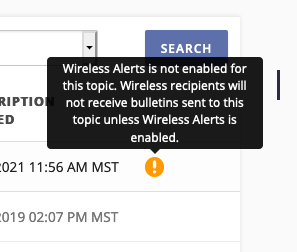
- Administrators using govDelivery for sending SMS messages can enable/disable Wireless Alerts at a topic level. If a topic includes wireless subscribers because wireless alerts were previously enabled, the system retains those subscribers (so that if wireless alerts are ever re-enabled, the subscribers will once again receive wireless alerts). We've updated the way that wireless subscribers appear when viewed in a topic subscriber list when that topic no longer allows wireless subscriptions. With this update, wireless subscribers will include an icon with a note that the subscriber is present in the topic, but will not receive any bulletins until wireless alerts are enabled. A similar note can be seen when viewing a wireless subscriber's list of subscribed topics (if a topic does not have wireless enabled).