This article contains release notes for the August 20, 2020 release of govDelivery.
Improvements and Enhancements
- Added a "Segment" column option to the Bulletin Analytics Report that will display what segment (if any) a bulletin was sent to in the report.
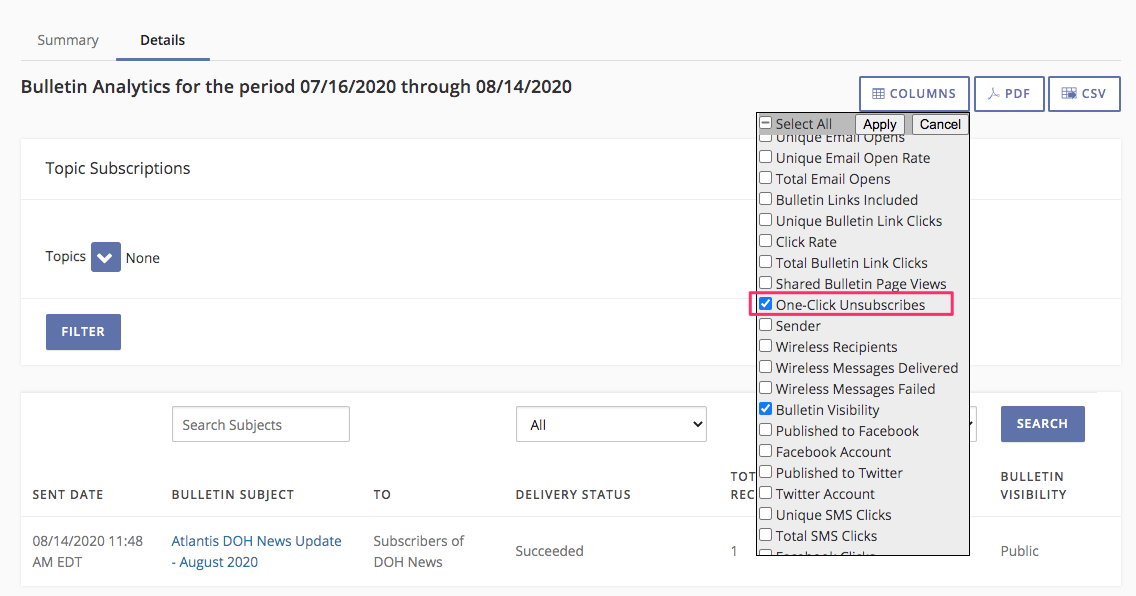
Accounts with segments enabled should see the segments column automatically in the Bulletin Analytics Report, but it can be added/removed by editing the "Columns" selection(s). If a bulletin was not sent to a segment the column will not contain any information. Report exports will also contain segment data if the column is selected for the report. - Added "One-Click Unsubscribes" as a column option to the Bulletin Analytics Report. This displays the number of clicks on a one-click unsubscribe URL for bulletins in the report. This only tracks clicks for one-click unsubscribe URLs (not including clicks to a subscriber preferences URL).
Unsubscribes can be added/removed by editing the "Columns" selection(s). Report exports will also contain unsubscribe click data if the column is selected for the report.
- The "Email" criteria filter (for sending bulletins/building segments) has been renamed to Subscriber Destination, and a new "does not contain" filtering criteria has been added for subscriber destinations. Additionally, this expands the criteria filter to include SMS destinations, enabling the ability to to filter/target SMS recipients as well. For example, a filter of "Subscriber Destination does not contain @" would filter a bulletin audience to only SMS recipients for the topic. Bulletins/campaigns using the "Email" filter previously should automatically update to the "Subscriber Destination" filter.
Bug Fixes
- Corrects an issue where it was possible to add over 140 characters to the preheader field in Advanced Bulletins. This would result in a 500 error if trying to save a draft with preheader text over the limit. The preheader field will now prevent an admin from going over that limit.


