New Features and Enhancements
In this section, you'll find updates to existing features as well as brand-new functionality.
Office Member Records for Peak Meeting Bodies
Peak Admins can now add office members to meeting bodies. Office members can be given a title and office and designated as voting or non-voting. Members will display on the meeting agenda when published to the Granicus Platform. Once this information is published, you'll no longer have to manually add meeting body members to a meeting in your other Granicus applications.
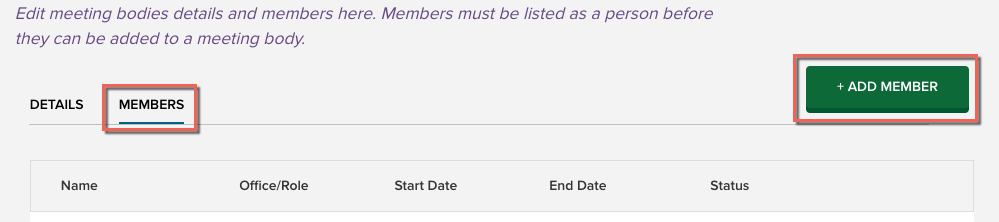
To add an office member, select the meeting body from the Meeting Bodies page in Peak Admin. Select the Members tab and click the Add Member button.
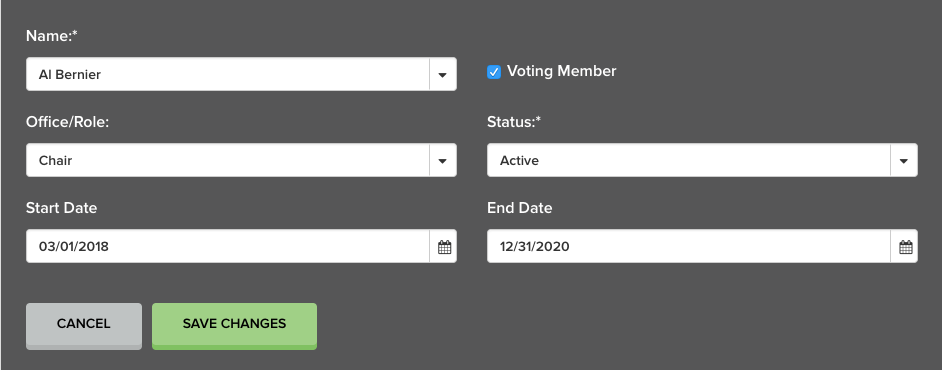
Office Members pull from people records in Peak, and a person can be selected from the Name drop-down menu. The names cannot be edited, but you can change which person is assigned to which office. Office Member records contain the following editable fields:
- Title
- Office
- Start Date
- End Date
- Status (required)
The Voting Member checkbox is selected by default. If a member is non-voting, deselect this checkbox. Voting member information is carried to the Granicus Platform when members are published.
Drafter Included in Items Page Export
The name of the user who drafted an item is now included in the CSV export from the Items Page.


