New Features and Enhancements
In this section, you'll find updates to existing features as well as brand-new functionality.
New Site Setting
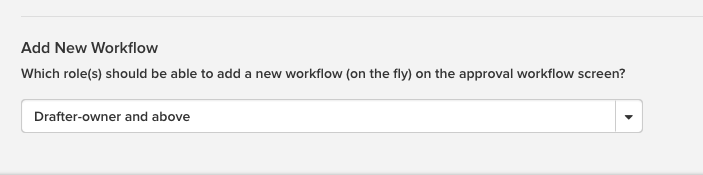
A new site-wide setting called Add New Workflow enables Admins to control which users can see and use the A New Workflow button on the Approval Status tab of the Item Details page. Navigate to Admin > Peak Configuration > Site Settings and use the drop-down menu to select Approvals only (disable feature), Drafter-owner and above, Agenda Coordinator and above, or Peak Admin only. Users who are disallowed from setting up a new workflow will need to select one from the available workflows in the Select a Workflow drop-down menu.
Updates to View Page Publishing from Peak
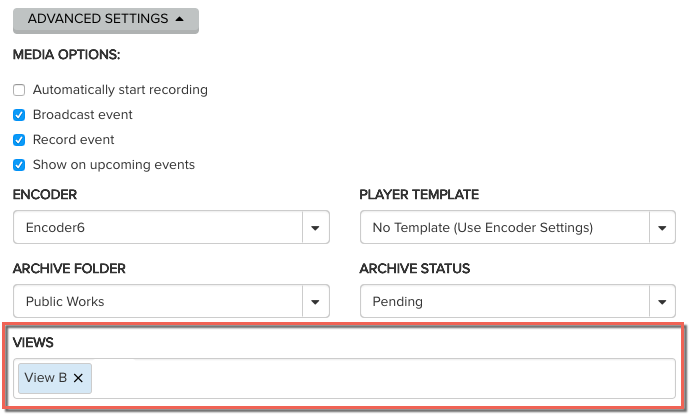
You can now assign a view page to a meeting prior to publishing the agenda, and the meeting will display on the assigned view. Previously an agenda would not show up until the agenda was published in Peak. There is a new Views field on the Meeting Details page under the Advanced Settings button. Click within the field to select available views from the menu. You can add more than one view if applicable.
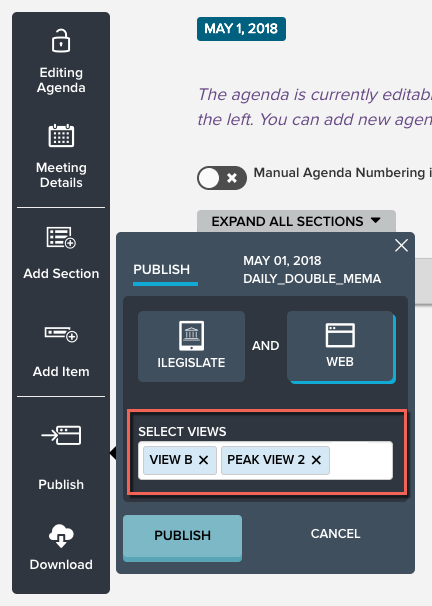
When you publish the agenda, you have the option to publish to more than one view page at a time. From the Agenda Details page, click the Publish option on the left menu. Select Web, and then click within the Select Views field to reveal a menu of available views. Use the x to the right of a view name to remove it. Select as many as are applicable and click Publish.