New Features and Enhancements
In this section, you'll find updates to existing features as well as brand-new functionality.
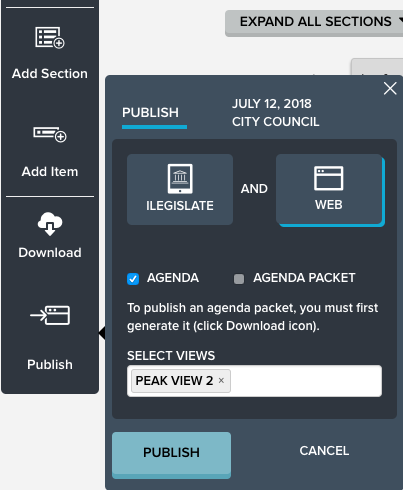
Change to Agenda Report/Packet Publishing in Peak
You can now publish Agenda Packets and Agenda Reports separately. Prior to this release, the packet would get published automatically with the Agenda Report. Packets will get published to view pages only if you choose. Please note that the position of the
Download and
Publish buttons on the left menu bar has been reversed.
Peak Approval Reminders Update
Last month we added the option to send an approval reminder email from the
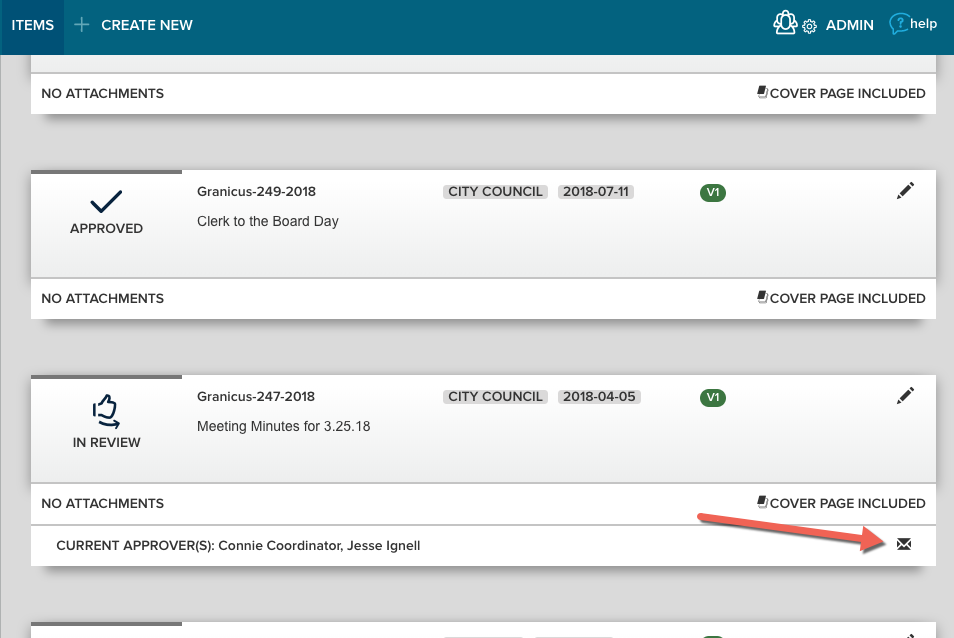
Approval Status tab of an agenda item with an active approval workflow. These reminders can now be triggered from two additional locations: the Items page and the Agenda page. Click the
envelope icon on the item card to send a reminder email. Note that you can send a reminder for the current phase only.
Bug Fixes
- Data from deleted custom item fields wasn't being deleted from the system. This caused problems when users attempted to update an item or create a new custom item field. This issue has been resolved.
- Previously when you created a new meeting or item, the save bar notification would inform you of unsaved changes even though no changes had been made. This is corrected. The Save and Cancel buttons are disabled when a new meeting is created or on an existing meeting, item, or agenda prior to changes being made. As soon as there are changes to the meeting, item, or agenda, the Save and Cancel buttons will again be enabled.
- Previously, Agenda Coordinators were able to create new agenda items (via "quick add" from Agenda) after an item submission deadline has passed for a meeting. This is fixed. Now, when Override Agenda Item Deadline is set to Peak Admin only, only Admin users can add new agenda items once the item submission deadline has passed for that agenda/meeting. If the setting is Agenda Coordinator and above, Drafters cannot add a new agenda item following the submission deadline. If the setting is Drafter-owner and above, other roles cannot add new agenda items following the submission deadline.


