New Features and Enhancements
In this section, you'll find updates to existing features as well as brand-new functionality.
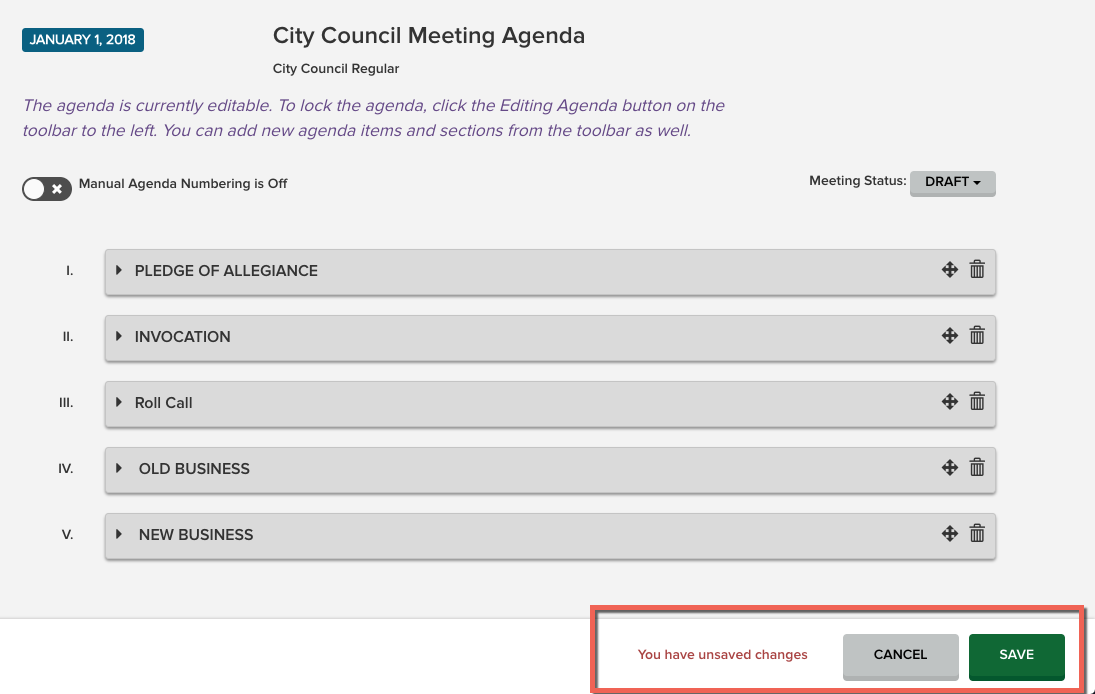
New Save Functionality for Agendas
We have added a Save/Cancel bar at the bottom of the agenda view for all agendas. When you make changes to the agenda, you will now need to click Save to keep the changes, or Cancel to discard. Changes will not be preserved automatically. There will be an unsaved changes notification within the Save/Cancel bar, and as an added precaution, if you attempt to navigate to another form within Peak without first clicking Save, a pop-up will ask you if you want to proceed and lose your changes, or go back to the previous page to save them.
- With the addition of this Save/Cancel bar, Agenda Coordinators can update manual numbering of individual sections all at once and save the changes together without losing some of their updates.
- When an Agenda Coordinator uses the Add Item button to add a new item or existing unscheduled item to an agenda and then clicks the Save button, the item's cover pages and the public and council agenda reports are created behind the scenes to be available when an agenda packet is generated. Note: If you attempt to generate the agenda packet too quickly after saving, the report may be out of sync with the agenda (for example, it might be missing the newly added item). If this happens, try generating the packet again.
Bug Fixes
- When a user republished an agenda report/packet from the Agenda page, the flyout on the left would occasionally fail to close on its own even though the reports were published to iLegislate and/or a view page. The flyout will now close to indicate the that publishing request has been submitted.
- When a user clicked the Generate Packet button on the agenda screen, the numbering toggle would turn manual numbering on and then back off again. This no longer occurs.
- When users published an agenda from the Agenda page, the system turned on manual numbering and locked the agenda on the screen. If the screen was refreshed, these changes were not made to the agenda. Therefore, nothing happens to manual numbering nor lock state of the agenda when an agenda is published. If an Agenda Coordinator wishes to lock the agenda themselves after publishing, they must do so manually by clicking the Editing Agenda button.


