New Features and Enhancements
In this section, you'll find updates to existing features as well as brand-new functionality.
Approval Workflows
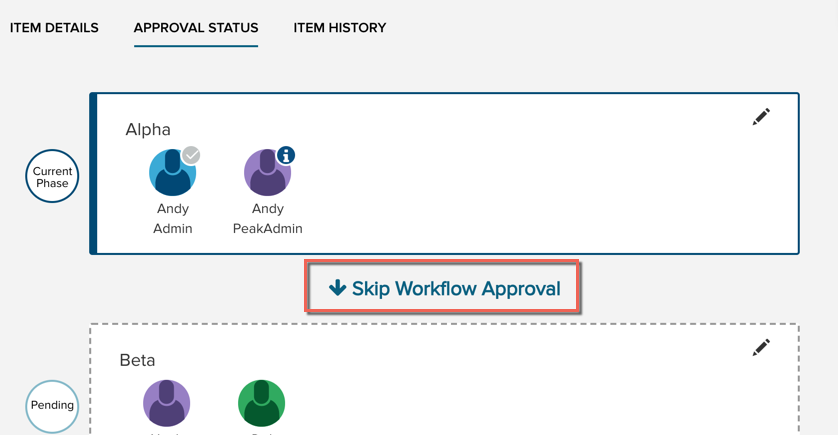
- Approval Workflows: On an in-progress workflow, the Skip to Next option is now called Skip Workflow Approval. The operation of this function remains the same: either the next phase of the workflow is activated, or the item moves to the approved state if there are no more phases in the workflow.
Meetings
- Meeting description: We've increased the capacity of the Description field to 65,535 characters. This field is available for display on the corresponding agenda report.
- If you make changes to any page containing the Cancel/Save bar but do not save, clicking Create New > Meeting or Create New > Agenda Item in the top menu now results in a warning modal to alert you about unsaved changes before you navigate away from the page.
Bug Fixes
- Agenda packet attachments: If there are any attachments on an agenda that have not converted to PDF, the attachment flyout now lists only those items and attachments that are on the current agenda. Previously, it included unassigned agenda items and their attachments as well.
- If Agenda Coordinators clicked the Add Item button to add existing items to an agenda but did not save, when opened again, the Add Item screen displayed the previously selected items. This has been fixed. Be sure to click Save when you want to keep changes made to an agenda.
- Workflow changes (initializing, skipping a phase, approving, and restarting) were incorrectly generating the "You have unsaved changes" notification on the Cancel/Save bar on the Item Details tab. We've fixed this, as workflow changes happen independently of item details and are not affected by save or cancel functions on the Item Details tab.
- On an agenda's Add an Agenda Item page, the Show: drop-down menu (agenda item type filter) displayed a limited number of item types. For those sites with a long list of types, the latter portion of the list was not accessible. We've corrected this.
- Newly created Peak meetings will again populate the agenda sections of the assigned meeting type. Previously, new meetings' agendas were absent of sections.
- From the agenda page of a meeting, users can again download attachments from agenda items that are present on a section of the agenda.
- Admins are no longer allowed to delete a meeting type from the system that is in use by at least one meeting. Although the meeting type may appear to be deleted if attempted, refreshing the Meeting Type page shows that the meeting type is not in fact deleted.
- When using the Add Item function to add an existing item to an agenda, users will not be able to edit the item until it has been saved to the agenda. The pencil icon will not display on the item card until you click Save. You will also see an "unsaved changes" warning if you attempt to examine the item details before saving.
- When publishing an agenda packet to iLegislate or a view page from the agenda screen, users would sometimes see an error on the Publish flyout for meetings that are part of a series. In spite of the error, the agenda report and packet were sent to the selected destinations and were correct. We have corrected the erroneous alert.
Internet Explorer 11–related bugs
- Users on Internet Explorer 11 can now turn on manual agenda numbering on the first attempt.
- We've fixed an issue on the Agenda page for users on Internet Explorer. The Download button is again accessible on the Download flyout when Agenda Packet is selected.


