New Features and Enhancements
In this section, you'll find updates to existing features as well as brand-new functionality.
Unpublish Peak Agendas from View Pages
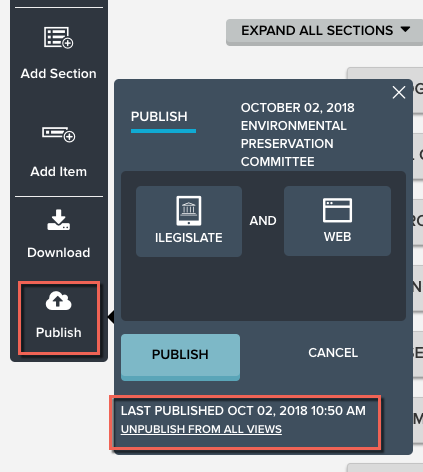
Peak admins can now unpublish an agenda or agenda packet, removing it from any view pages to which it is currently published. You can also track of the last time the agenda was published from the publishing fly-out. From the agenda page, click the Publish option on the left menu bar, and use the link at the bottom of the fly-out to unpublish.
Bug Fixes
- An issue with the Save bar on the agenda item page prevented changes to an item's drafter from being saved. We've fixed this, and a change to the item's drafter registers as a pending change, activating the Save bar and enabling users to save.
- We've fixed an issue in which meeting series deletion was not working as expected. Going forward, you will not be able to bulk-delete past meetings in a series. Only future meetings can be deleted as a batch. To delete meetings that occurred in the past, remove them from Peak individually.


