New Features and Enhancements
In this section, you'll find updates to existing features as well as brand-new functionality.
Legistar Integration: Creating Agenda Items
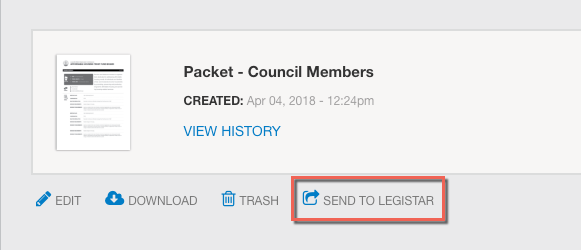
After you create a packet, you'll see the Send to Legistar button.You can now create Legistar agenda items from within Boards and Commissions. After you create a packet, you’ll still have the opportunity to search for an existing Legistar agenda item and send the packet to it, or you can instead create a new agenda item to attach the packet to and send both to Legistar.
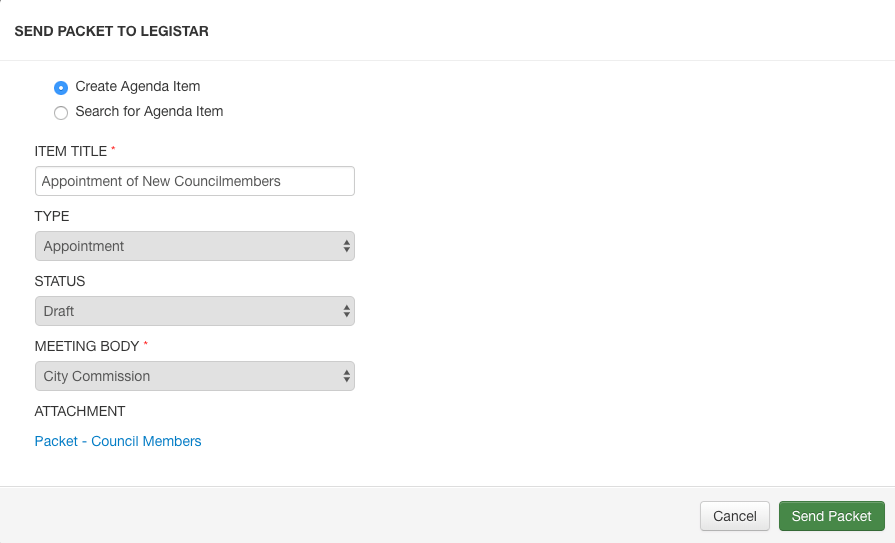
Once you click the Send to Legistar link, the Send Packet to Legistar modal opens. The Create Agenda Item radio button is selected by default. Enter an agenda item title and select an item type, item status, and meeting body from the drop-down menus. The item type, status, and meeting body from the linked Legistar database provide the menu options. All fields are required: if you do not enter data for the agenda item title, the type, the status, or the meeting body, you will receive an error upon attempting to create the agenda item.
The packet displays as an attachment link at the bottom of the Send Packet to Legistar modal. You can click this link to preview the packet, which will open in another tab.
Once an agenda item is created, you can see the agenda item listed in the packet history. Open the File History modal by clicking View History underneath the packet name.
If you want to send the an existing agenda item rather than creating one, select the Search for Agenda Item radio button and search for the item from there as before. When sending a packet from Boards and Commissions to Legistar, you will no longer see files with a final action date listed in the search results. This reduces the number of results to make the list easier to use.
Note: If your jurisdiction has both B&C and Legistar, please contact your Granicus Account Manager if you are interested in enabling the integration.


