This article contains release notes for the September 20, 2019 release of Boards and Commissions.
Improvements
Updated Permissions Structure
- We are changing how permissions are managed for Boards and Commissions. We are doing this to set the stage for a more robust and flexible permissions structure in the future.
What's changing?
- Previously, Administrators assigned permissions and roles through Granicus Platform at the user group level. Now, users will still be added to user groups in Granicus Platform, but their role will be assigned in Boards and Commissions. For a more detailed explanation about what is changing and how your workflow will be affected, read our Updated Permissions article.
- We've updated the text that applicants see when they start filling out a blank application form and enter an email address for an existing application. We hope that these changes will encourage applicants to modify their existing application instead of starting a new one.
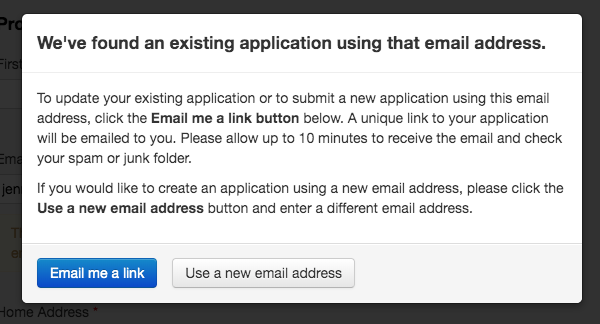 Figure 1
- In preparation for rolling out our snapshot applications later this year (one application for every board an applicant applies to), we've replaced text that says 'Application' to 'Applicant Details'. One example of this change is in the Actions dropdown menu (Figure 2).
We made this change because it better reflects that the application form the applicants have access to can change at anytime, serving more as the applicant's profile. Later this year, we will roll out the board-specific, read-only Applications, that are snapshots of the Applicant Details at the time they apply. We're creating these new Applications so you have a reliable record for your data retention needs.
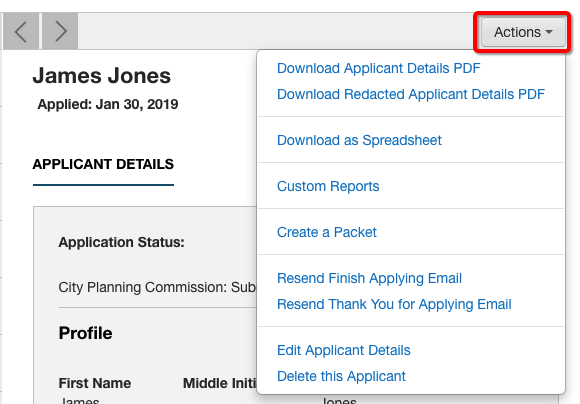 Figure 2
 We also removed the 'Edit Tracking' and 'Edit Application' buttons on the People page. These buttons were redundant since you can access both from the Tools menu. We also wanted to keep all administrator tools in one location.
- Text on the 'Workflow Statuses' tab of the Application Builder referenced the ability to remove statuses that were not being used. That information was not accurate, and we have updated the wording of the Workflow Statuses tab to accurately describe the way statuses work in our system today.
- We made accessibility improvements by replacing the all caps heading and titles with mixed case. And, we increased both the contrast and font size in the Board Detail and Board Roster reports.
Bug Fix
The following bug has been fixed:
- The outdated 'Contact Us' links have been removed from Boards & Commissions. Please use the 'Help Center' link in MediaManager to contact our Support team.
If you want to learn about new features, improvements, and fixes for other products in the govMeetings product suite, check out the full release notes for
govMeetings: September 20, 2019.


