Table of Contents
To start receiving release note emails, you need to:
- Go to the subscriber portal.
- Enter your email.
- Click Submit.
- Select the checkboxes next to each topic you wish to receive emails for.
- Note: If you do not know which topics to subscribe to, scroll down to the next section of this article, "To which release notes do I subscribe?"
- Click Submit.
- Click Finish.
To ensure that our emails do not go to your spam folder, please add releaseteam@updates.granicus.com to your Safe Sender list.
When signing up to receive release note emails you are asked which topics you want to subscribe to. Following are the different options and their associated products:
govDelivery release notes include information about govDelivery.
govAccess release notes include information about govAccess Vision websites.
OpenCities release notes include information about govAccess OpenCities websites. You can choose to receive emails for the following areas:
- United States
- Australia and New Zealand
- United Kingdom
govMeeting release notes cover the following products:
- Boards and Commissions
- Encoder/Meeting Server
- iLegislate
- IQM2
- Legistar
- LiveManager
- MediaManager
- MinutesMaker
- NovusAGENDA
- Peak Agenda
- Perfomance Accelerator
- VoteCast
OneMeeting release notes include information on OneMeeting.
govService release notes include information on govService Firmstep.
Host Compliance release notes include information on Host Compliance.
OpenForms release notes include information on OpenForms. You can choose to receive emails for the following areas:
- United States
- Australia and New Zealand
GovQA release notes include information on GovQA.
Simpleview release notes cover the following products:
- CRM Apex
- CRM 3.0
- CMS
- DMS
- DAM
- Mint+
- Data Engine
- Destination Dashboards
Sign up to receive release note emails.
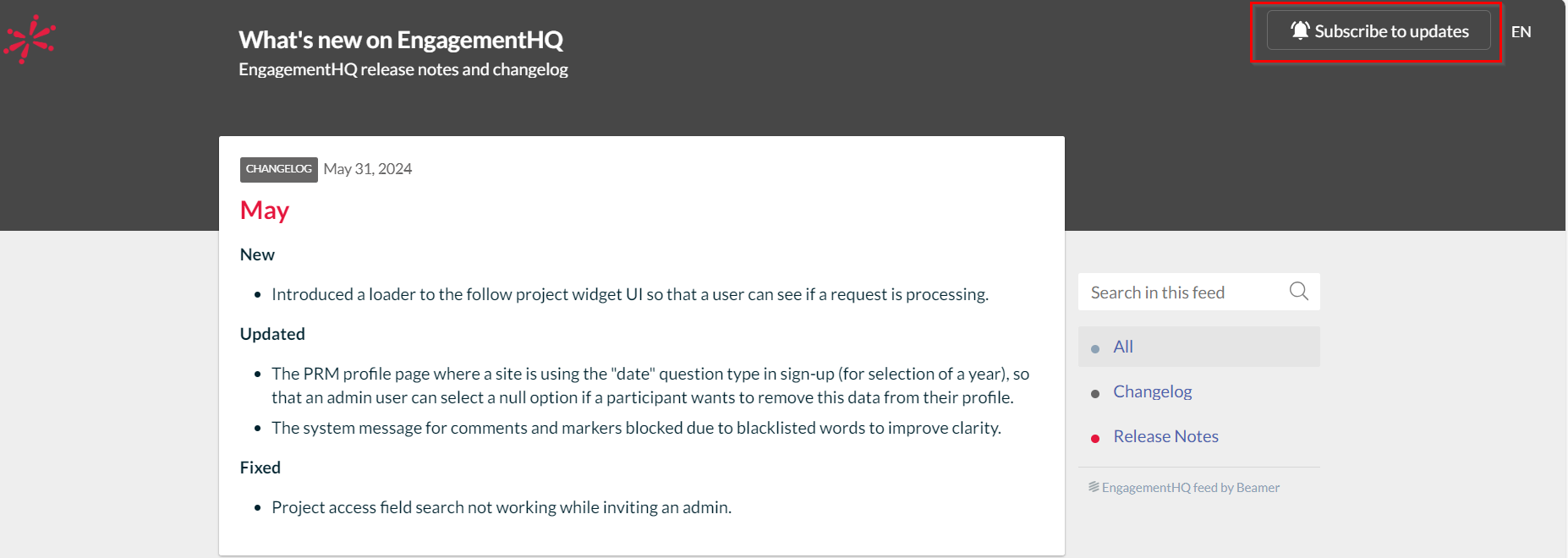
EngagementHQ release notes signup is found on the What's New on EngagementHQ site.
- Once there, click Subscribe to Updates at the top right.
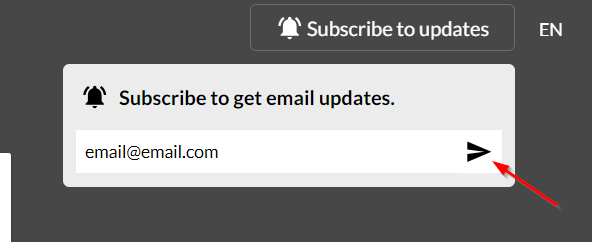
- Enter your email.
- Click the arrow to proceed.
- A confirmation email is sent for you to verify your email address.
Once you are subscribed, the Subscribe to Updates button is removed from the top right.
What is Included in Release Notes Emails
Release note emails may include:
- Summary of new features
- Improvements we have made to our product
- Upcoming changes
Release notes include a link to an article that includes details of the most recent changes made to the product.
Find links below to helpful articles on our Subscriber Center:
For more resources, check out our Subscriber Center. If after visiting the Subscriber Center you still need help, contact support using the tools here.


