Contents
What Is Open Tracking?
When you use Granicus Communications to send a bulletin, the system tracks how many of your subscribers open your bulletin. This article covers what counts as an open and how we track them, and answers some common questions around this subject.
What Constitutes An Open?
With the way modern email inboxes work, defining an open isn't as simple as saying that a subscriber clicked your email. For an open to be recorded, the embedded web beacon included in the bulletin must render. The embedded web beacon is a 1x1 pixel image that we automatically insert into bulletins when we send them. Each subscriber receives a unique web beacon. The web beacon must be downloaded for the email to be recorded as open. Web beacons are the industry standard for tracking email open rates.
How Do We Report Opens in Granicus Communications?
You can see how many of your subscribers opened your bulletin by viewing the Bulletin Detail Report for your sent bulletin. We track opens on two metrics: Total Opens and Unique Opens.
- Total Opens is the number of times email recipients opened a bulletin.
- Unique Opens is the number of times recipients opened a bulletin for the first time. For example, if a subscriber opens a bulletin twice, they have one Unique and two Total Opens.
What Can Cause High Open Rates?
If you see open rates that are higher than usual, see below some factors that may contribute. Please note that these patterns impact all email communications platforms, not just Granicus.
A subscriber forwarded a bulletin.
- Whenever a subscriber forwards a bulletin, the system records any opens for the forwarded email as an additional open for your original subscriber. This may explain why some subscribers may have a much higher number of total opens. The web beacon sent to a subscriber is tied specifically to their subscriber profile. If a subscriber forwards the bulletin that they receive to a group of individuals (or if you are emailing a distribution list email which delivers the bulletin to multiple individuals), every person who opens that bulletin technically opens the same bulletin that we sent to the subscriber. This means that they are also downloading the same web beacon. As a result, the system records all of the opens as belonging to the original recipient of the bulletin.
A large proportion of your subscribers enabled Apple's Mail Privacy Protection.
- In 2021, Apple released a feature called Mail Privacy Protection which offers Apple Mail app users the option to load remote content privately, without disclosing their IP addresses. This has the effect of marking an email as open regardless of whether or not the email was opened, resulting in inflated total open rates.
An aggressive spam filter is inflating open rates.
- Some aggressive spam filters, especially those used by private email domains, download all images in incoming emails before delivering them to the inbox. They do this to ensure that they don't contain malicious content. Since tracking opens relies on a 1x1 pixel image called a web beacon, when a spam filter downloads that image, our reporting tools record an open event. As a result, these spam filters can inflate open rates from a particular email domain. If you notice an especially high number of opens from a single domain, you might want to request that recipients from that domain allow-list Granicus's IP addresses or add your from address to their Safe Senders list. For more information about how to identify this issue and allow-list Granicus's IPs, see Allowlisting IP Addresses for Sending.
What Can Cause Low Open Rates?
The frequency, relevancy, and quality of the communications you send to your audiences are of course the most important aspects to consider when reviewing the open rates of your bulletins. See below some other factors to be aware of that can contribute to low open rates:
If a subscriber does not download images in a bulletin.
- Some inboxes are configured to display only a preview of emails, with no images displayed. This means that the subscriber must download images in the bulletin they receive in order for the open to to be tracked. The subscriber must click a link to download or display the images. By clicking the link to download or display the images, the web beacon will download as well resulting in the email being recorded as open.
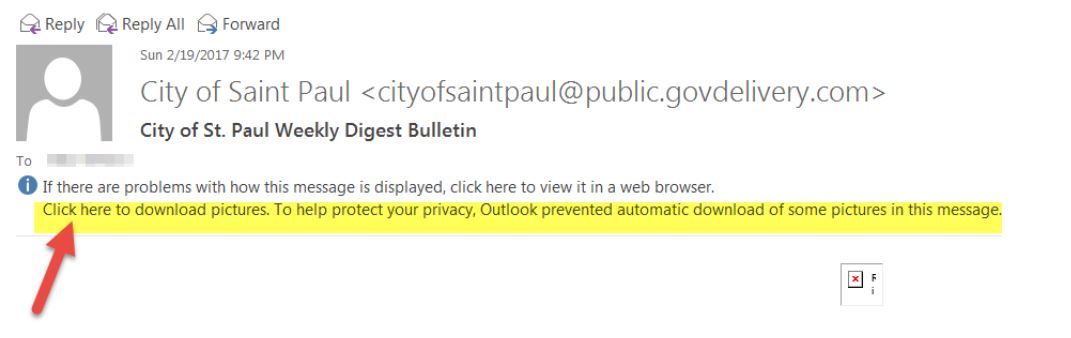
If a subscriber receives a text-only version of the email.
- If the bulletin is text-only, then subscribers do not download the web beacon and we are unable to track an open for that subscriber.
Open tracking is disabled.
- By default, most of our accounts have open- and link click-tracking enabled. If this feature has been disabled, the metrics are not available in your reports.
Not enough time has passed from when you sent the bulletin and when your subscribers opened it.
- We recommend waiting several hours after a bulletin has been sent to allow subscribers time to check their inbox and open the bulletin.
Gmail clipped the bulletin.
- Gmail can clip content and hide it behind a View Entire Message link if the email is large. This also clips the web beacon that tracks opens. By reducing your message size to below 102kb, it helps to ensure that Gmail does not clip your content.
What Can Cause a Record to Show a Link Click But Not an Open?
- If a subscriber does not download images, we are unable to track the open. But if they click a link, we are still able to record the link click, because that is tracked through a different method.


