As part of our
COVID-19 Toolkit, Granicus is pleased to offer the COVID-19 govNews Feed, a real-time feed of localized information from trusted government partners. Access a small snippet of code that can be placed on your website to update constituents with real-time, relevant information on COVID-19.
Features:
- Small snippet of code that can be placed on any website
- Customizable location at the state, county, or federal level
- Real-time updates from trusted government partners
To implement the govNews Feed on your website:
- Go to https://covidtoolkit.granicus.com/tools/covid-19-toolkit/govnews-feed. This page provides additional details on using the feed on your website.
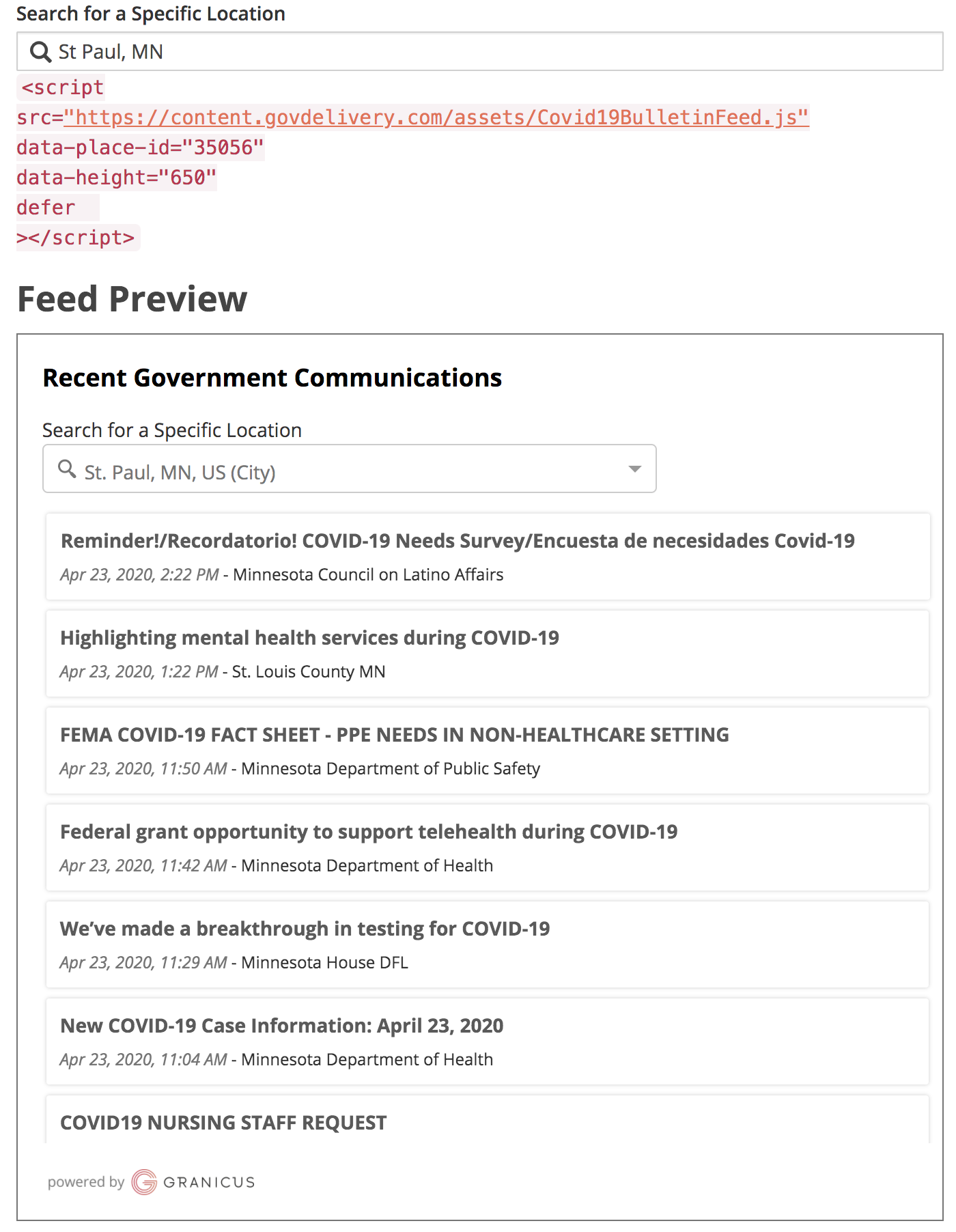
- Search for your location (city, county, or state) in the search box provided, and select your location from the drop-down menu. The code snippet will update with the correct ID to match the selected location
- Copy the displayed code beginning with <script and add it to your webpage where you would like the feed. The code should be added somewhere inside the <body> of your page. The feed will not display if placed within the <head> element.
 Best practices and things to consider:
- Prioritize a placement for the feed that sits "above the fold" on your website (visible without scrolling).
- Dedicate a specific page on your website to local updates.
- Allocate at least 25% of page width for optimal viewing on desktops.
- Keep your mobile audience in mind by testing responsive designs.
Note: Not all selected locations will display results. It is recommended to check the live preview before adding the code to your webpage.
The govNews Feed pulls in govDelivery bulletins based on the area selected. If you searched for a city, the feed is populated by communications from Granicus customers at the city, county, and state level. (For example, if you select “St. Paul, MN”, the feed would show communications from Granicus customers in St. Paul, Ramsey County, and Minnesota state government). If you search for a county, the feed is populated by county and state-level bulletins. If you search for a state, state-level government communications will appear in the feed. If you want to display only communications from the federal government, search for “United States”.
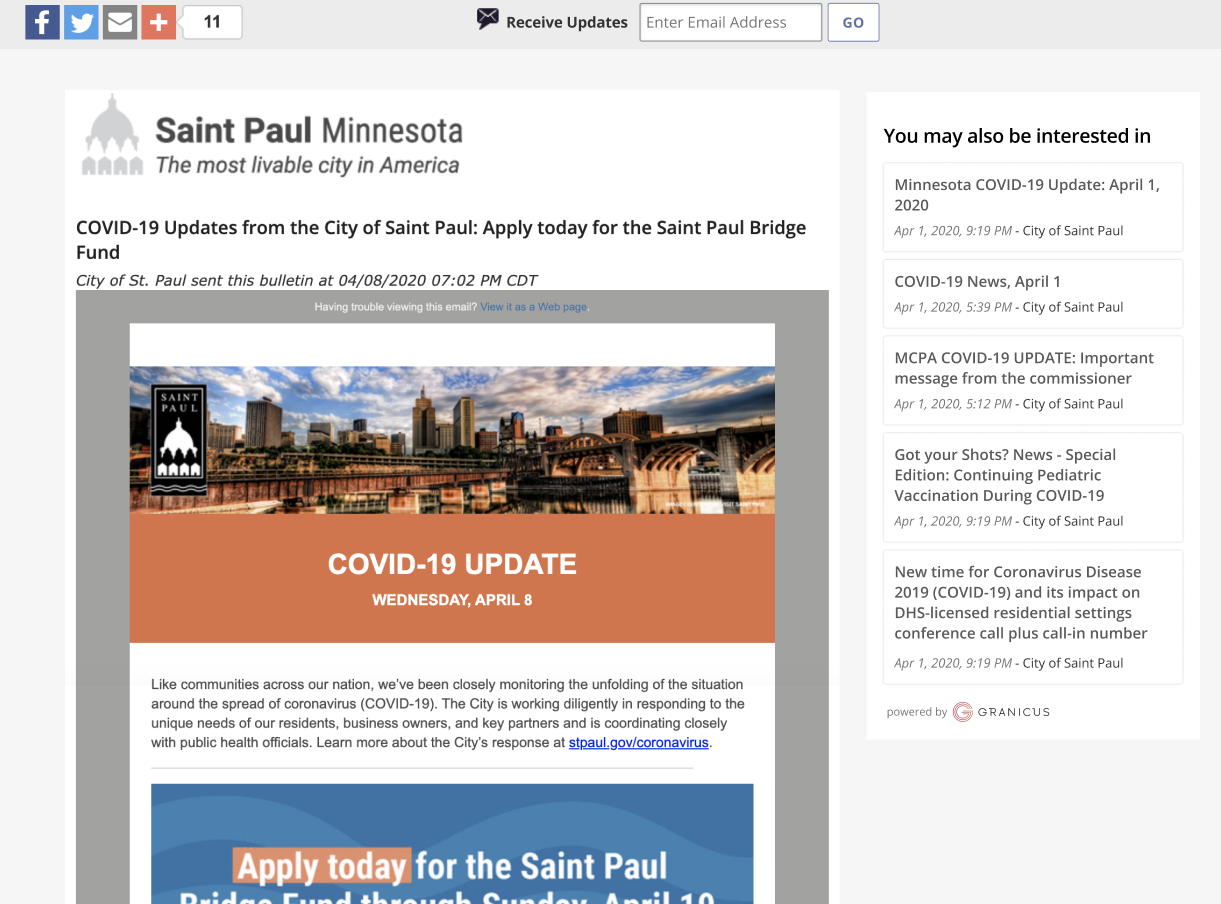
The Feed displays the 100 most recent COVID-19-related govDelivery bulletins sent in the selected region. (If there are fewer than 100 bulletins for the region, they are all displayed.) The most recent bulletin appears first, at the top of the feed. If a visitor clicks on any of the items in the feed, a shared bulletin page opens, allowing them to read the full text of that bulletin.
This shared bulletin page also displays a sidebar featuring up to five similar, COVID-19-related bulletins from the same account. Viewers can click on any of these bulletins to see its shared bulletin page, allowing them to quickly move between communications relevant to what they are currently reading.
The govNews Feed will update automatically when new bulletins are sent from govDelivery in the location selected. You do not need to update or change the feed snippet in any way. The embedded feed also includes a search bar, where visitors can refine or change the location to display communications from other areas if they choose, making it easy for constituents to quickly access information from across the country.
Frequently Asked Questions
- What content will appear in the govNews Feed?
- The COVID-19 govNews Feed consists of bulletins sent from govDelivery clients in the area selected, either at the city, county, or state level. These are bulletins with Message Visibility set to “Public”, and a subject line which includes the terms “covid”, “coronavirus”, or “corona virus”. Bulletins meeting these criteria will appear regardless of topic visibility, meaning topics set to “unlisted” or “restricted” may also appear in this feed.
- I selected a location, but no bulletins appear in the feed. Why?
- The govNews feed pulls in communications from GovDelivery bulletins. If there are no govDelivery customers in your immediate area, try changing your location to a larger area nearby.
- Can I change the appearance of the feed on my site?
- You can change the height of the feed by changing the “data-height” variable within the code snippet from the original 500 pixels to whatever height you prefer.
- Can I change the number of bulletins which appear in the feed?
- At this time, the number of bulletins displayed in the feed cannot be changed. The feed displays the 100 most recent COVID-19-related govDelivery bulletins sent in the selected region. If there are fewer than 100 bulletins for the region, all are displayed.
- Can I include multiple feeds on my site?
- Yes. You can generate as many snippets for as many different locations as you like. Each snippet must be added to your website for it to display.
- Is the govNews Feed available for agencies outside of the United States?
- At this time the feed is available for locations in the United States and the United Kingdom.
- One of my account's bulletins is appearing in this feed, but it should not be publicly available. How can I remove it?
- You will need to Unpublish the Shared Bulletin Page for the bulletin so it is no longer publicly available. Note that due to our caching system, it may take up to three hours to remove the bulletin preview from the feed. However, during this time if you have already unpublished the shared bulletin page, it will not be available, and any feed preview for the bulletin will result in a broken link.


